Noctua NF-A4x20 in a 10-inch rack
Noctua's 40 mm NF-A4x20 fan in a 10-inch rack: the 1U four-fan panel, 12 V FLX and 5 V PWM variants, airflow, noise and wiring.

On this page
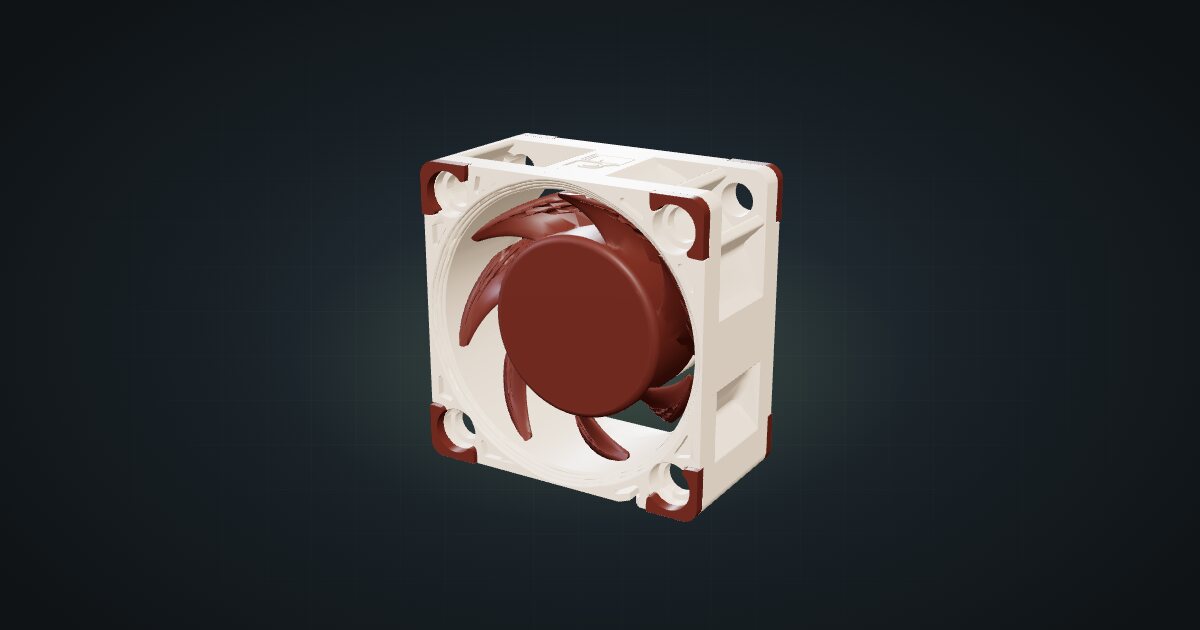
The NF-A4x20 is a 40 mm fan from Noctua, and in a 10-inch rack it is the usual answer to “how do I move some air without hearing it”. It is small enough that four fit in one rack unit, quiet on paper and rated for a very long life. It suits racks full of passive gear that runs warm, or a closed frame that needs a gentle, steady draught.
At a glance
| Size | 40 × 20 × 40 mm (W × D × H) |
| Design | SSO2 bearing, A-Series blades with Flow Acceleration Channels |
| Speed | 5000 RPM max (±10%) |
| Airflow | 9.4 m³/h max |
| Noise | 14.9 dB(A) max |
| Power | 0.6 W max at 12 V (FLX); 0.5 W max at 5 V (PWM) |
| MTTF | > 150,000 h |
Where it fits in a mini rack
Most of what goes into a 10-inch rack has no fan of its own: unmanaged switches, small routers, single-board computers, PoE injectors. Each one is happy on a desk. Stacked a unit apart in a closed frame, they share the same warm air. A row of 40 mm fans gives that air somewhere to go.
The numbers set the expectations. At 9.4 m³/h maximum airflow and 2.26 mmH₂O static pressure, one fan moves a modest amount of air, which is exactly right for a draught across a shelf or through a frame and wrong for cooling a hot box by brute force. Four of them in a row, pulling in the same direction, make a useful front-to-back flow. At 14.9 dB(A) maximum per fan, it stays in the background on a desk or in a living room.
What it is not: a fix for a device that overheats on its own. A mini PC or a NAS with its own fan manages its own temperature; give it space and a clear exhaust path first, and use the fan panel to clear the warm air from the rack, not to force air into a closed case.
How it fits a 10-inch rack
The configurator places the fan in one dedicated carrier:
The 4 × 40 mm fan panel is a 1U panel with 4 bays and only 24 mm of depth. It fits every RackMate frame, from the T0 and T1 at 200 mm deep to the Plus frames and the T2 at 260 mm. Each fan has its own position, so you can start with two and add the rest later.
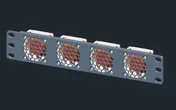
Placement decides whether it helps. Put the panel in the unit directly above or below the gear it serves, or at the top of the frame as exhaust, since warm air rises anyway. The panel is shallow, so the space behind it stays free for cables.
There is no shelf or floor placement for the fan on its own: it needs a panel to hold it in the airflow path.
Power
Noctua rates the 12 V FLX version at 0.6 W maximum and the 5 V PWM version at 0.5 W maximum. The catalogue assumes the FLX variant and plans for 0.6 W per fan, a manufacturer maximum rather than a measured figure. There is no low figure in the catalogue.
Either way it is a rounding error next to almost anything else in the rack. The planning question is not how much power the fans draw but where they get it from.
The catalogue model does not identify the voltage variant. The 12 V FLX and the 5 V PWM versions look the same, so check the label before you wire one to a supply.
Wiring and airflow
The fan has no network ports, so the cabling question is power only.
- 12 V FLX: a 3-pin connector. It wants a 12 V fan header or a 12 V supply.
- 5 V PWM: a 4-pin PWM connector at 5 V. Noctua lists the same speed, airflow and noise as the 12 V version.
Keep the fan leads inside the rack. They run from the panel to the power source along the frame, and they never need to leave the rack or loop around it. If several fans share one supply, bundle their leads behind the panel so they do not hang in the airflow you are trying to create.
For direction, Noctua’s sheet describes the fan standing upright with airflow front to back. Mount every fan in the panel the same way: one fan blowing against the others turns a draught into turbulence.
Full specifications
Plan it
Open the Noctua NF-A4x20 in the catalogue to add it to a rack plan with the fan panel, or start from a community build that already uses it:
Planning a custom build with a bigger cooler? The Noctua NH-L9x65 guide covers Noctua’s low-profile CPU heatsink.
Sources
Related guides
Noctua NH-L9x65 heatsink only in a 10-inch rack
Noctua's low-profile NH-L9x65 heatsink in a 10-inch rack: AM5 and LGA1851 support, fan options, height, TDP limits and its place in a Mini-ITX build.
Raspberry Pi Zero 2 W in a 10-inch rack
The Raspberry Pi Zero 2 W in a 10-inch rack: shelf-only placement, Wi-Fi as its only network, 512 MB of RAM and a micro-USB 5 V supply.
UGREEN NASync DXP2800 in a 10-inch rack
The two-bay UGREEN DXP2800 in a 10-inch rack: 4U on the rack floor of a 260 mm frame, one rear 2.5GbE port, two NVMe slots and an N100.