Raspberry Pi Zero 2 W in a 10-inch rack
The Raspberry Pi Zero 2 W in a 10-inch rack: shelf-only placement, Wi-Fi as its only network, 512 MB of RAM and a micro-USB 5 V supply.

On this page
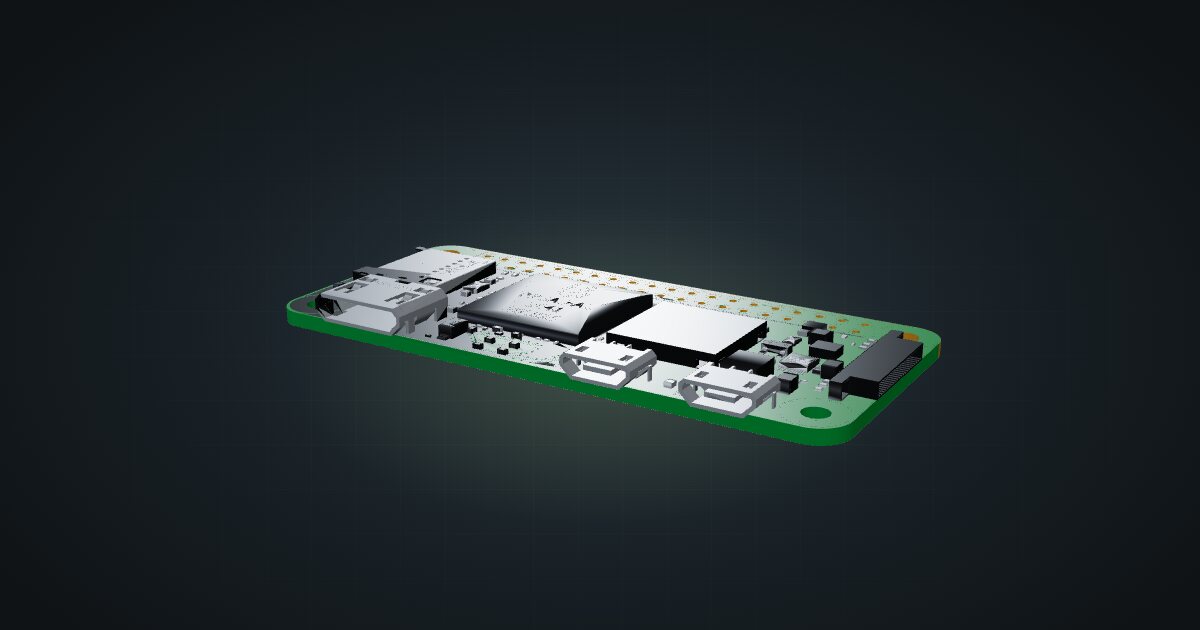
The Raspberry Pi Zero 2 W is the smallest computer in the catalogue: a 65 × 30 mm board with four Cortex-A53 cores, 512 MB of memory and wireless networking only. It has no Ethernet port and no dedicated rack mount, which makes it a niche pick for a 10-inch rack. For one light, always-on job that needs a tidy home, though, little else is this small or this frugal.
At a glance
| Processor | Four Cortex-A53 cores at 1 GHz |
| Memory | 512 MB SDRAM |
| Storage | microSD card slot |
| Wireless | 2.4 GHz 802.11b/g/n Wi-Fi, Bluetooth 4.2 |
| Connections | Mini-HDMI, micro-USB OTG, micro-USB power |
| Power | 5 V DC 2.5 A via micro-USB |
| Board | 65 × 30 mm |
Where it fits in a mini rack
Treat the Zero as an appliance with a single job. Good candidates: a Wi-Fi client that probes coverage and latency from inside the rack, a sensor or GPIO project that reports to a bigger server, a USB gadget hanging off another machine through the OTG port, or a lightweight helper service on the wireless side of the network. Four Cortex-A53 cores handle that kind of work; 512 MB of memory is the limit you hit first.
The GPIO header comes unpopulated, with only the 40-pin footprint on the board. If a project needs it, plan on soldering a header or buying a board with one fitted.
What it is not: a cluster node, a container host, a NAS, or anything that belongs on a wired network. With no Ethernet port and 2.4 GHz-only Wi-Fi, all traffic goes over the air, and 512 MB rules out most container stacks before they start.
How it fits a 10-inch rack
There is no dedicated mount for this board in the catalogue, so it lives on a shelf. The configurator checks the shelf placements against every rack:
Both placements use the 10i hex shelf: flat in 1U, or standing upright in 2U, each 154 mm deep. They fit all six RackMate frames, including the 200 mm deep T0 and T1, so depth is never the constraint.
Flat is the sensible choice. A 65 × 30 mm board barely occupies the shelf, which leaves most of the deck free for the other small devices that share the unit, such as a compact switch or another board. Giving a whole unit to a single Zero is a waste of rack space; sharing one is the point.
The catalogue models the bare board. A case, a heatsink or a soldered GPIO header changes its height and footprint, so check the shelf layout against what you actually install.
Power
The product brief specifies 5 V DC at 2.5 A through the micro-USB power port. The catalogue budgets 1.75 W for the bare board doing light work and plans for 10 W, based on Raspberry Pi’s recommended 5 V × 2 A supply. The low figure is typical active draw, not a measured idle minimum, and the high figure is a supply allowance rather than anything the board is expected to pull.
In rack terms that is a rounding error. The real cost is one more micro-USB supply and one more outlet, which in a crowded mini rack is usually the scarcer resource. If a USB hub or a powered accessory hangs off the OTG port, budget for that as well.
Networking and cabling
The Zero has no Ethernet port, so the catalogue lists no network ports for it and there is nothing to patch. Its only network is 2.4 GHz 802.11b/g/n Wi-Fi, plus Bluetooth 4.2 for local peripherals. Reception inside a rack depends on what surrounds the board, so check signal strength where it will actually sit, not on your desk.
If a job really needs a wire, a USB Ethernet adapter on the micro-USB OTG port is the usual workaround. The catalogue does not model one, so plan its cable route yourself, and remember that the OTG port is then no longer free for gadget mode or other peripherals.
No Ethernet means the Zero depends entirely on your Wi-Fi. Anything critical, such as primary DNS, belongs on a wired board instead.
How it differs from the Raspberry Pi 5
Same brand, very different job:
- CPU: four Cortex-A53 cores at 1 GHz on the Zero; the Pi 5’s BCM2712 has four Cortex-A76 cores at 2.4 GHz.
- Memory: 512 MB on the Zero, against 1, 2, 4, 8 or 16 GB variants on the Pi 5.
- Networking: 2.4 GHz Wi-Fi and no Ethernet on the Zero; Gigabit Ethernet and dual-band Wi-Fi on the Pi 5.
- Power: 5 V DC 2.5 A over micro-USB, against a 5 V / 5 A USB-C supply. The catalogue budgets 1.75 W against 4 W typical active, and 10 W against 25.5 W at the top end.
- Temperature: -20 to +70 °C for the Zero, 0–70 °C for the Pi 5.
- Rack fit: the Pi 5 has four dedicated community mounts; the Zero has none and lives on the shelf.
If the job needs a wire, more memory or a mount of its own, the Pi 5 is the answer. If it needs to be small, wireless and nearly free to run, the Zero is.
Full specifications
Plan it
Open the Raspberry Pi Zero 2 W in the catalogue and place it on a hex shelf alongside whatever shares that unit. No published community build includes it yet.
For the full-size boards, read the Raspberry Pi 5 guide and the Raspberry Pi 4 guide.
Sources
Related guides
Raspberry Pi 4 Model B in a 10-inch rack
Racking the Raspberry Pi 4 Model B: three printable mounts including a 2-SSD NAS plate, a 5 V / 3 A USB-C supply and one front Gigabit port.
Raspberry Pi 5 in a 10-inch rack
How the Raspberry Pi 5 fits a 10-inch rack: four printable mounts, a 5 V / 5 A USB-C supply, front-facing Ethernet and the full spec sheet.
JetKVM in a 10-inch rack
JetKVM in a 10-inch rack: KVM-over-IP for the machine beside it, three printable combo mounts, a rear 100 Mbps port and a tiny power budget.