IceWhale ZimaBoard 2 in a 10-inch rack
IceWhale ZimaBoard 2 in a 10-inch rack: fanless Intel N150, two 2.5GbE ports, PCIe 3.0 x4 and two SATA, 1U flat on the hex shelf, plus two community panels.
 Mira Voss@nullroute5 min read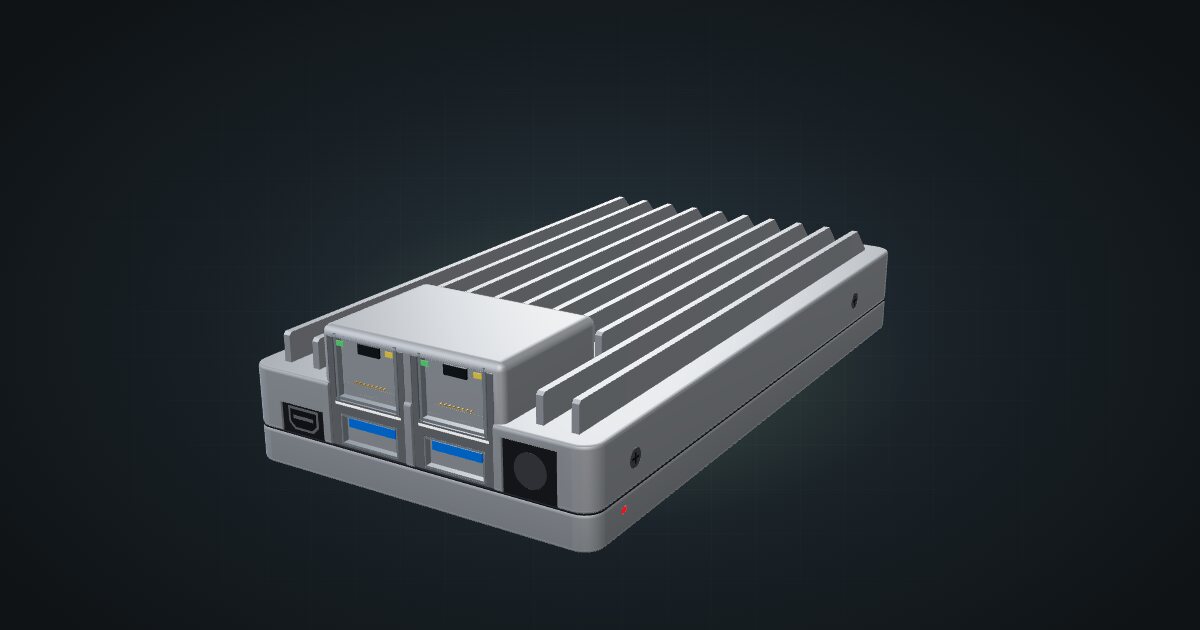
On this page
The ZimaBoard 2 is IceWhale’s fanless single-board server: an Intel N150, two 2.5GbE ports, a PCIe 3.0 x4 slot and two SATA connectors with power, in a finned aluminium body that is also the heatsink. It suits a rack that wants a quiet x86 router, a small two-drive NAS or a low-power container host. It is small enough that fitting it is easy; cooling and cable ends are what need a plan.
At a glance
| Processor | Intel N150, 4 cores, 6 MB cache, up to 3.6 GHz, 10 W TDP |
| Memory | 16 GB LPDDR5-4800 on the 1664, 8 GB on the 832 |
| Storage | 64 GB eMMC on the 1664 (32 GB on the 832), plus 2 × SATA 3.0 with power |
| Networking | 2 × 2.5GbE RJ45 (Intel I226-V) |
| Expansion | 1 × PCIe 3.0 x4 slot on the side of the board |
| Power | 12 V DC barrel jack; 6 W idle (manufacturer) |
| Size and weight | 83 × 140 × 31 mm, 407 g |
Where it fits in a mini rack
Two 2.5GbE ports on Intel I226-V controllers make it a natural router or firewall: one port for WAN, one for LAN, and an x86 CPU that runs OPNsense, pfSense or a plain Linux router without Arm caveats. Both ports run faster than Gigabit, so a multi-gig internet connection doesn’t get capped at the box.
The two SATA connectors carry power as well as data, which turns it into a small NAS for two drives without an extra power board. ZimaOS Plus comes pre-installed for exactly that job, and the 16 GB on the 1664 leaves room for a handful of containers next to the file shares. The PCIe 3.0 x4 slot is the wildcard: an NVMe adapter, a faster network card or anything else that fits a side-mounted slot.
It has no power button and boots when power is applied. In a rack that is a feature: a switched power strip or a smart PDU outlet becomes its on/off switch.
What it is not: a host for many VMs. Four cores and at most 16 GB are enough for a router, a NAS and some containers, not a virtualization lab. For that, a mini PC with more cores and memory slots is the better tool.
How it fits a 10-inch rack
There is no dedicated ZimaBoard 2 mount in the catalogue yet, but it doesn’t need one to fit. The configurator checks both shelf placements against every rack:
On the 10i hex shelf it lies flat in 1U at 154 mm deep, or stands upright in 3U at the same depth. Both placements fit all six RackMate frames, including the four-unit T0 and T0 Plus. The 140 mm-deep body sits inside the shelf, with room behind it in both the 200 mm and 260 mm frames for the SATA cables on its rear end.
Width is the detail to watch. The aluminium body is 77 mm wide, but the PCIe slot projects 5.97 mm from the left side, for 83 mm overall. A card in that slot sticks out sideways, so leave space beside the board, not just behind it.
Two community 10-inch panels exist outside the catalogue: the 10-inch rack panel for ZimaBoard 2 and the ZimaBoard 2 10” rack & PCIe Dual NVME M.2 SSD Card, both on MakerWorld. Both mount the board flat, fins up, I/O end forward; the second, going by its name, also makes room for a dual NVMe card in the PCIe slot. Neither is in the configurator yet, so plan with the flat shelf placement, which has the same orientation.
The ZimaBoard 2 is cooled only by its fins. Lying flat with the fins up, it needs open air above it, so leave the unit above it empty or fill it with something that doesn’t run hot.
Power
IceWhale lists 6 W idle and a 10 W TDP, and the catalogue uses 6 W as the low end. The high end is 25.3 W, the peak CNX Software measured at the wall under load; its stress-ng runs mostly sat at 20–21 W. CNX also measured 6.8–9.0 W idle across NAS, mini-PC and router setups with two SATA drives attached, which is a fairer idle figure for a board doing real work.
PCIe cards and SATA drives add to all of this. The 12 V / 5 A (60 W) adapter is the supply, not the draw. For rack planning, budget around 25.3 W for the board plus whatever drives and cards you add, and give the adapter brick a place behind the shelf.
Networking and cabling
Both 2.5GbE RJ45 ports sit on the I/O end, which faces the front of the rack. Patch them to front keystones or straight to a front-facing switch port in the same rack; a multi-gig switch such as the YuanLey YS25-0802T keeps both links at full speed. The Mini DisplayPort 1.4, the two USB 3.1 Type-A ports and the 12 V DC jack are on the same face.
That means the power lead also leaves at the front. Route it inside the frame to the adapter, for example down the side of the shelf, and never around the outside of the rack. The SATA data and power connectors are on the rear end, so drives sit behind the board.
How it differs from the Raspberry Pi 5
The Raspberry Pi 5 is the board most mini racks start with, so the comparison is worth making:
| ZimaBoard 2 | Raspberry Pi 5 | |
|---|---|---|
| CPU | Intel N150, x86, 4 cores up to 3.6 GHz | BCM2712, Arm, four Cortex-A76 cores at 2.4 GHz |
| Networking | Two 2.5GbE RJ45 | One Gigabit Ethernet |
| Storage | eMMC plus two powered SATA ports | microSD; M.2 through a separate HAT |
| Expansion | PCIe 3.0 x4 slot | PCIe 2.0 x1 |
| Power | 12 V DC; 6 W idle to 25.3 W measured peak | USB-C 5 V / 5 A; 4 W typical active to 25.5 W supply allowance |
| Cooling | Fanless finned housing | Bare board, cooler not included |
| Catalogue mounts | Hex shelf only | Four dedicated mounts |
The Pi is the simpler cluster node, with far more mount options. The ZimaBoard 2 is the one to pick when you need two fast ports, real SATA or x86 software.
Full specifications
Plan it
Open the ZimaBoard 2 in the catalogue to place it on the hex shelf in your rack plan.
The Raspberry Pi 5 guide covers the Arm board compared above, and the YuanLey YS25-0802T guide covers a switch with enough 2.5G ports for a rack of them.
Sources
Related guides
Raspberry Pi 4 Model B in a 10-inch rack
Racking the Raspberry Pi 4 Model B: three printable mounts including a 2-SSD NAS plate, a 5 V / 3 A USB-C supply and one front Gigabit port.
Raspberry Pi 5 in a 10-inch rack
How the Raspberry Pi 5 fits a 10-inch rack: four printable mounts, a 5 V / 5 A USB-C supply, front-facing Ethernet and the full spec sheet.
YuanLey YS25-0802T in a 10-inch rack
YuanLey YS25-0802T in a 10-inch rack: eight 2.5GbE and two 10G RJ45 ports, fanless, front 12 V input, a 6U upright shelf fit and a 1U community cage.