Dell OptiPlex Micro 7020 in a 10-inch rack
Dell's OptiPlex Micro 7020 in a 10-inch rack: 35 W Intel T-series CPUs, up to 64 GB DDR5, two M.2 SSD slots, rear GbE and 1U flat on the hex shelf.
 Mica Voss@micavoss4 min read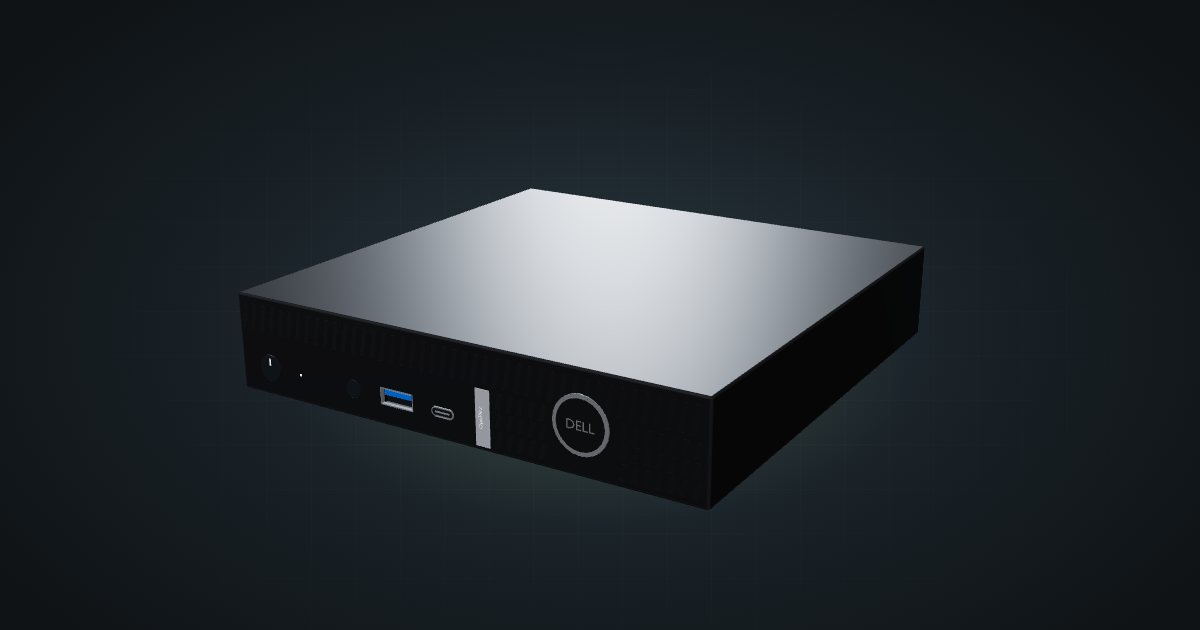
On this page
The OptiPlex Micro 7020 is Dell’s one-litre business PC with 12th to 14th Gen Intel T-series processors and DDR5. Dell describes it standing on its side; in a 10-inch rack it lies flat on its foot side and takes a single unit on the hex shelf. With two M.2 SSD slots and up to 64 GB of memory it suits a compact Proxmox node or a small cluster.
At a glance
| Processor | Intel Core i3 to i7 14th Gen T-series, Core 300T or 12th Gen i3/i5 T-series; 35 W; Intel Q670 |
| Memory | 2 × DDR5 SO-DIMM, 4800 or 5600 MT/s, up to 64 GB |
| Storage | 2 × M.2 2230/2280 SSD slots |
| Networking | One 10/100/1000 Mbps RJ45 (Intel WGI219LM) at the rear |
| Power | External 65 W or 90 W adapter, 19.5 V DC |
| Size and weight | 182 × 178 × 36 mm lying flat, 1.24 to 1.32 kg |
| Operating temperature | 10 to 35 °C |
Where it fits in a mini rack
Every processor option is a 35 W part, from the Core 300T and i3-14100T up to the i7-14700T vPro. That keeps heat predictable when several units share a frame. Memory runs at 4800 MT/s on most CPUs and at 5600 MT/s with the i5-14600T vPro and i7-14700T vPro.
Two M.2 slots take 2230 or 2280 SSDs, so a mirrored boot pool or separate VM storage is possible without adapters. An optional video port can carry HDMI 2.1, DisplayPort 1.4a, VGA or USB-C with DisplayPort Alt Mode and Power Delivery in; in a rack you rarely need more than the built-in outputs.
What it is not: a storage or fast-network box. There is no 2.5-inch bay and no faster NIC than the onboard Gigabit port.
How it fits a 10-inch rack
The configurator checks each placement against every rack in the catalogue:
On the 10i hex shelf it lies flat in 1U at 182 mm deep and fits every RackMate frame. Upright, the way Dell draws it, it needs 5U, which rules out the four-unit T0 and T0 Plus and wastes space everywhere else.
No community mount for the 7020 Micro is listed in the catalogue yet. In the 200 mm-deep T0 and T1, 182 mm of shelf depth leaves little room behind the chassis for the rear plugs, so the 260 mm frames are the easier fit.
Power
Dell ships a 65 W or a 90 W adapter, both 19.5 V DC with a 4.5 mm connector. Those are ratings, not consumption, and the owner’s manual gives no idle or load figure. The catalogue therefore lists the low end as unknown and uses 90 W as the high allowance.
Plan rack power from the adapter you have, and give each adapter a place behind the shelf or on the rack floor, away from the data rail.
Dell’s operating range is 10 to 35 °C. Keep the rear vent grid clear; with the machine lying flat, the louvres run along the top edge of the front.
Networking and cabling
The single RJ45 port is a 10/100/1000 Mbps Intel WGI219LM at the rear. Patch it to a rear keystone in the same rack instead of running the cable around the frame. The rear also carries two USB 2.0 ports (one with Smart Power On), two USB 5Gbps ports, HDMI 1.4b and DisplayPort 1.4a.
At the front, lying flat, you get the power button, a universal audio jack, a USB 5Gbps port with PowerShare and a USB-C 10Gbps port. Wi-Fi is an optional M.2 2230 card.
How it compares to the OptiPlex 5000 Micro
| OptiPlex Micro 7020 | OptiPlex 5000 Micro | |
|---|---|---|
| CPU | 12th to 14th Gen T-series, 35 W | 12th Gen T-series, 35 W |
| Memory | 2 × DDR5 SO-DIMM | 2 × DDR4-3200 SO-DIMM |
| Storage | 2 × M.2 SSD | One M.2 NVMe plus a 2.5-inch bay |
| Adapters | 65 W or 90 W | 90 W or 130 W |
| Size lying flat | 182 × 178 × 36 mm | 182 × 178 × 36 mm |
The two share the same outside dimensions. The 7020 swaps the 2.5-inch bay for a second M.2 slot and moves to DDR5.
Full specifications
Plan it
Open the OptiPlex Micro 7020 in the catalogue to add it to a rack plan on the hex shelf. The OptiPlex 5000 Micro guide covers the older model compared above.
Sources
Related guides
Dell OptiPlex 5000 Micro in a 10-inch rack
How the Dell OptiPlex 5000 Micro fits a 10-inch rack: 12th Gen T-series CPUs, up to 64 GB RAM, an NVMe SSD and 1U flat on the hex shelf.
Lenovo ThinkCentre M70q Gen 6 in a 10-inch rack
Lenovo's current ThinkCentre Tiny in a 10-inch rack: Core Ultra Series 2, up to 64 GB DDR5, two NVMe slots, rear GbE and 1U flat on the hex shelf.
Lenovo ThinkCentre M910q Tiny in a 10-inch rack
How the ThinkCentre M910q Tiny fits a 10-inch rack: 6th/7th Gen Intel on Q270, vPro on some models, no PCIe slot, a rear Gigabit port and two 1U mounts.