GL.iNet Comet Pro (GL-RM10) in a 10-inch rack
GL.iNet Comet Pro in a 10-inch rack: 4K30 KVM over IP with HDMI loop-out, a rear Gigabit port, under 8 W, and 2U flat on the hex shelf.
 Mira Voss@nullroute5 min read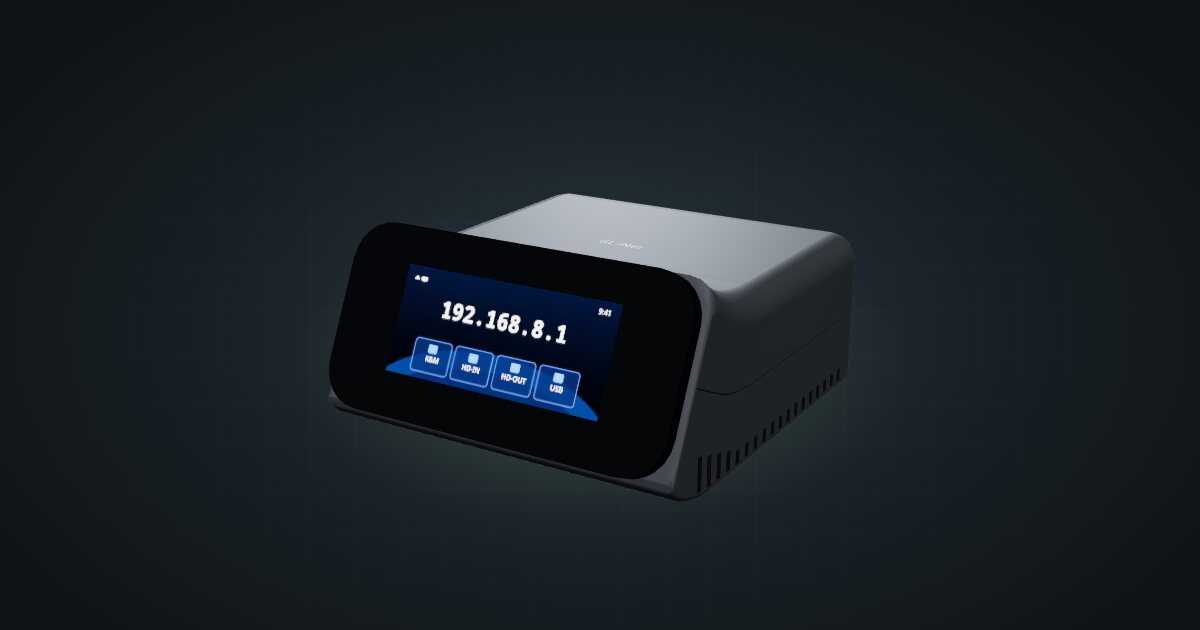
On this page
The Comet Pro is GL.iNet’s KVM over IP with a touchscreen: it captures a computer’s HDMI output at up to 4K, acts as its keyboard and mouse over USB-C, and serves both to a browser, the GLKVM app or a Tailscale network. In a mini rack it is the remote console for the machine beside it. This guide covers the Comet Pro (GL-RM10), not the base Comet (GL-RM1) or the PoE Comet (GL-RM1PE).
At a glance
| Role | KVM over IP for one machine: HDMI capture plus USB-C keyboard and mouse |
| Video | HDMI in up to 4K@30 fps, H.264, 30–60 ms latency; HDMI loop-out |
| Processor | Quad-core Arm Cortex-A53, 1 GB DDR3L, 32 GB eMMC |
| Networking | 1 × 1 GbE RJ45 on the rear; Wi-Fi 6 dual-band |
| Display | 2.22-inch TFT touchscreen |
| Power | USB-C, 5 V / 2 A; about 2–3 W measured, under 8 W rated |
| Size and weight | 84 × 93 × 47 mm, 170 g |
Where it fits in a mini rack
A KVM over IP earns its unit by looking after something else. Pair the Comet Pro with a hypervisor host, so a machine that will not boot is still reachable from the BIOS up. Pair it with a firewall appliance, where one bad rule can lock you out of the network you would use to fix it. Or pair it with a box you reinstall often.
Three details set it apart. The HDMI output passes the picture through to a local monitor, so the console still works at the rack. The USB 2.0 Type-A port (max 0.5 A) powers an ATX board or a Fingerbot, accessories that reach a machine’s power button, and Wake-on-LAN covers machines that support it. And the Wi-Fi 6 radio means it can join the network without a cable, although in a rack the wire is the dependable path.
What it is not: a multi-host KVM switch. It has one HDMI input and one keyboard and mouse link, so it serves one machine.
How it fits a 10-inch rack
The Comet Pro is compact, but tall for its footprint:
There is no dedicated mount for the Comet Pro in the catalogue. The 10i hex shelf takes it flat in 2U or upright in 3U, both at 154 mm deep, and both fit all six RackMate frames, from the 200 mm deep T0 and T1 to the 260 mm Plus frames and the T2. Nothing is blocked.
At 47 mm to the top of its tilted bezel, the Comet Pro is taller than 1U on its own, which is why even the flat placement takes two units. Flat is still the one to pick: the touchscreen faces the front, and all the connectors face the back. Leave room behind its 93 mm depth for the cables: HDMI in and out, two USB-C leads, Ethernet and possibly the USB accessory.
A community mount also exists: the 10-inch rack mount for Comet Pro (GL-RM10) KVM on MakerWorld. It is not in the configurator yet, so the fit check above does not cover it. GL.iNet also publishes printable 10-inch rack files of its own.
Power
ServeTheHome measured about 2–3 W in operation, which the catalogue records as a typical 2.5 W. The GL-RM10 datasheet states consumption below 8 W, and the catalogue plans with that upper bound. The 5 V / 2 A rating of the PD-compatible USB-C input describes the supply, not the draw, and USB accessories such as the ATX board or Fingerbot are excluded.
The useful part for rack planning is the separate power input. The Comet Pro has its own USB-C power port beside the keyboard and mouse USB-C, so it stays up when the machine it manages is switched off. There is no PoE input on this model; GL.iNet offers a separate PoE splitter for that.
Networking and cabling
The one Gigabit RJ45 port is on the rear, and it is the only port that takes network cabling. Patch it to the rear socket of a keystone coupler, then run a short front patch from that keystone to a front-facing switch port. Never loop the cable around the side of the rack to reach the front.
The HDMI and USB-C leads run to the machine being managed. Put the Comet Pro in the unit next to it, so those cables stay short and never leave the back of the rack.
A KVM over IP gives full console access to the machine behind it, down to the BIOS. Keep it on a management network or behind Tailscale, never exposed directly to the internet.
How it differs from the JetKVM
The JetKVM does the same job in a smaller box, and the trade-offs are clear:
- Video. The Comet Pro captures up to 4K@30 fps and adds HDMI loop-out; the JetKVM captures 1080p at 60 fps. Both use H.264 with 30–60 ms latency.
- Network. 1 GbE RJ45 plus Wi-Fi 6 here, against one RJ45 port at up to 100 Mbps on the JetKVM.
- Hardware. A quad-core Cortex-A53 with 1 GB DDR3L and 32 GB eMMC, against a single-core Cortex-A7 with 256 MB DDR3L.
- Power. The Comet Pro has its own USB-C power input; the JetKVM draws 5 V through the same USB-C port that links to the target. A third-party bench test put the JetKVM at 0.6 W idle and 1.8 W peak.
- Rack fit. The JetKVM is 43 × 60 × 31 mm, lies flat on the hex shelf in 1U and has three dedicated combo mounts in the catalogue. The Comet Pro needs 2U on the shelf.
- Temperature. The Comet Pro is rated 0 to 40 °C, the JetKVM 10–35 °C.
If the machine you manage sits in 1U and space is tight, the JetKVM’s combo mounts win. If you want 4K capture, a local monitor and Gigabit, the Comet Pro is worth its second unit.
Full specifications
Plan it
Open the GL.iNet Comet Pro in the catalogue to place it on a hex shelf next to the machine it manages. No community build uses it yet.
For the smaller KVM, read the JetKVM guide. For a router from the same maker, see the Beryl AX guide.
Sources
Related guides
JetKVM in a 10-inch rack
JetKVM in a 10-inch rack: KVM-over-IP for the machine beside it, three printable combo mounts, a rear 100 Mbps port and a tiny power budget.
GL.iNet Beryl AX (GL-MT3000) in a 10-inch rack
GL.iNet Beryl AX in a 10-inch rack: a Wi-Fi 6 travel router with a rear 2.5 GbE WAN and Gigabit LAN, 2.6 W idle, flat on the hex shelf in 1U.
Beelink Mini S12 / N100 in a 10-inch rack
How the Beelink Mini S12 / N100 fits a 10-inch rack: two 1U mounts, one with a JetKVM, a 6 W TDP N100, a 36 W adapter and a rear Gigabit port.