Zyxel GS-108B v3 in a 10-inch rack
Zyxel GS-108B v3 in a 10-inch rack: eight unmanaged Gigabit ports on the rear, 3.0 W max from a 5 V adapter, flat on the hex shelf in 1U.
 Mira Voss@nullroute5 min read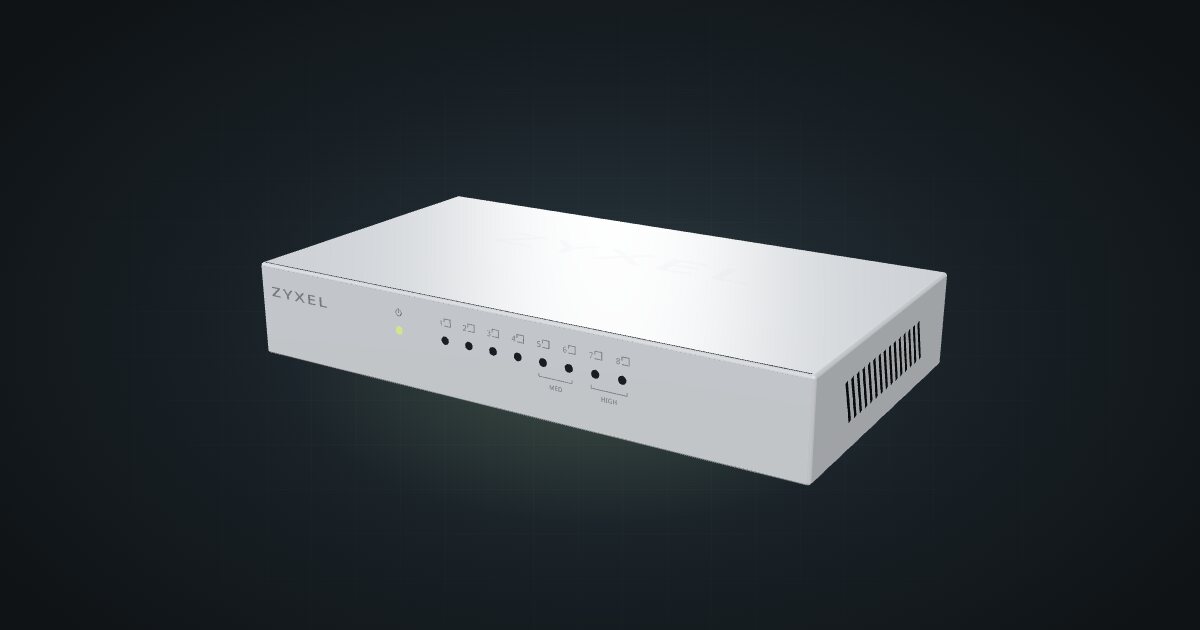
On this page
The Zyxel GS-108B v3 is an eight-port unmanaged Gigabit switch in a fanless metal case, rated at 3.0 W maximum. Like the rest of the GS-105B and GS-108B line, it puts its ports and power jack on the back and its LEDs on the front. It suits a rack with more devices than a five-port switch can serve and nothing that needs VLANs.
At a glance
| Ports | 8 × Gigabit RJ45, auto MDI/MDIX, all on the rear |
| Management | Unmanaged (plug-and-play) |
| Priority ports | Ports 7–8 high, ports 5–6 medium |
| Switching capacity | 16 Gbps |
| Power | External adapter, 5 V DC / 1 A; 3.0 W max |
| Size and weight | 155 × 85 × 26 mm, 325 g |
| Operating temperature | 0 to 40 °C |
These are hardware v3 figures. The GS-108B v2 used a larger 164 × 98 × 26 mm chassis, so check the label on your unit, especially before printing a mount.
Where it fits in a mini rack
Eight ports is the comfortable size for a busy mini rack: an uplink to the router, then a pair of mini PCs, a NAS, a few single-board computers and a KVM. With nothing to configure, it suits a rack you build once and leave alone, or a cluster where every node needs a port and none needs special treatment.
Ports 7–8 are high priority and ports 5–6 medium, so the uplink or a latency-sensitive machine can take a better seat without any setup. It supports IEEE 802.3az Energy Efficient Ethernet and 9 KB jumbo frames, and the 4K-entry MAC table is far beyond anything a mini rack will fill. The 16 Gbps of switching capacity covers all eight Gigabit ports in both directions.
What it is not: a managed switch. There are no VLANs, no PoE and nothing faster than Gigabit. If you need to separate traffic, do it on the router or a managed switch upstream.
How it fits a 10-inch rack
The v3 chassis is low and shallow, and the configurator checks it against every rack:
There is no dedicated mount for the GS-108B v3 in the catalogue. The 10i hex shelf takes it flat in 1U or upright in 4U, both at 154 mm deep, and both fit all six RackMate frames, from the 200 mm deep T0 and T1 to the 260 mm Plus frames and the T2. Nothing is blocked.
Flat in 1U is the placement to use. The LED plate faces the front, so you can read link lights without opening the back, and at 85 mm deep the switch leaves plenty of shelf behind it for patch cables. Upright spends four units for nothing.
Two community mounts exist on MakerWorld: a 10-inch 1U rack mount for the Zyxel GS108B 8-port switch and a 1U rack mount for the GS105B v2 and GS108B. Neither is in the configurator yet, so the fit check above does not cover them.
Both brackets were drawn around the 164 × 98 mm v2 chassis. The v3 is 155 × 85 × 26 mm, smaller in both width and depth, and may sit loose in a bracket cut for the v2. Check the hardware version a mount was made for before printing.
Power
Zyxel’s v3 datasheet lists 3.0 W as the maximum, and the catalogue budgets that figure. Idle draw is not published; it falls with fewer active links thanks to 802.3az. The external adapter is rated 5 V DC / 1 A on a 100–240 V AC input, which is a supply rating, not the switch’s draw.
For rack power planning the switch is a rounding error, even with all eight ports lit. The adapter is the real cost: one more plug on the strip behind the rack. The DC jack is on the rear plate, so the power lead stays at the back.
Networking and cabling
All eight Gigabit ports sit in one frame on the rear plate, ports 8 to 1, next to the 5 V DC jack. Rear ports mean rear keystones:
- Patch each switch port you use to the rear socket of a keystone coupler. The keystone’s front socket presents that port at the front, where short patches reach devices with front-facing Ethernet.
- A device whose port also faces the rear gets its own rear keystone, and a short front patch joins its keystone to the switch’s keystone.
- Never route a cable around the outside of the rack to reach the switch.
A fully used GS-108B v3 needs eight rear keystones, plus one for every device whose Ethernet also faces the rear. Plan the keystone panel before you fill the switch.
How it differs from the GS-105B v2
The GS-105B v2 is the five-port model of the same line, but on the older, larger chassis:
- Ports. Five Gigabit ports against eight, with port 5 high priority and ports 3–4 medium.
- Capacity. 10 Gbps of switching capacity and a 2K-entry MAC table, against 16 Gbps and 4K here. Both support 9 KB jumbo frames and 802.3az, and the v2 specification also lists loop detection.
- Power. A 9 V DC / 0.6 A adapter and 3.5 W max, against 5 V DC / 1 A and 3.0 W for the GS-108B v3.
- Size. 164 × 98 × 26 mm and 369 g, against 155 × 85 × 26 mm and 325 g. The eight-port v3 is the smaller box.
- Rack fit. Identical in the catalogue: flat in 1U or upright in 4U on the hex shelf, ports on the rear.
The mount situation is the practical difference: the v2 chassis is the one the community brackets were drawn around.
Full specifications
Plan it
Open the Zyxel GS-108B v3 in the catalogue to place it on a hex shelf and lay out its rear keystones. No community build uses it yet.
For the five-port sibling, read the Zyxel GS-105B v2 guide. For an eight-port switch with front-facing ports, see the NETGEAR GS108 guide.
Sources
Related guides
Zyxel GS-105B v2 in a 10-inch rack
Zyxel GS-105B v2 in a 10-inch rack: five unmanaged Gigabit ports on the rear, 3.5 W max from a 9 V adapter, flat on the hex shelf in 1U.
NETGEAR GS108 v4 in a 10-inch rack
NETGEAR GS108 v4 in a 10-inch rack: eight unmanaged Gigabit ports, 4.9 W maximum draw, two 1U community mounts and front-only cabling.

Protectli Vault FW6A in a 10-inch rack
Protectli Vault FW6A in a 10-inch rack: a fanless six-port Gigabit firewall in a 2U carrier with five keystones, or flat on the hex shelf.