Hardkernel ODROID-XU4 in a 10-inch rack
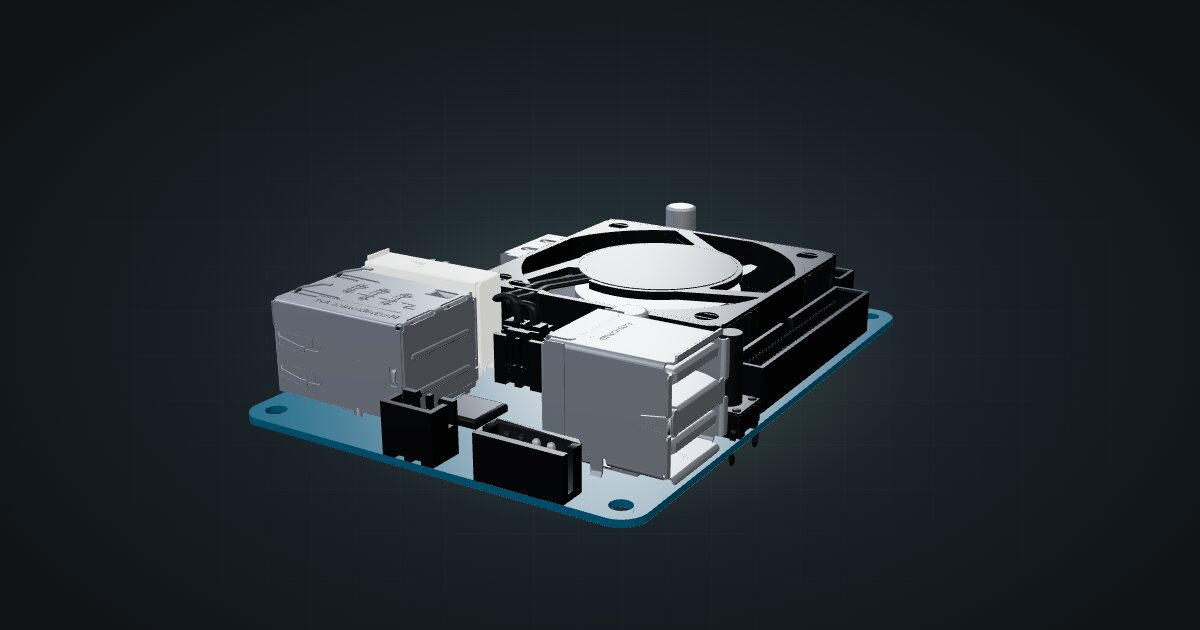
The Hardkernel ODROID-XU4 in a 10-inch rack: eight Arm cores, 2 GB of RAM, USB 3.0 storage, one Gigabit port and shelf-only placement.

On this page
The Hardkernel ODROID-XU4 is a veteran Arm board that still turns up in homelabs: a Samsung Exynos 5422 with eight cores in a big.LITTLE layout, 2 GB of memory, USB 3.0 and Gigabit Ethernet, with a fan on top. It suits racks built from boards you already own and light jobs that want more CPU than a basic Pi-class board, as long as its age and software support fit your plans.
At a glance
| Processor | Samsung Exynos 5422: 4 × Cortex-A15 at 2.0 GHz + 4 × Cortex-A7 at 1.4 GHz |
| Memory | 2 GB LPDDR3 |
| Storage | eMMC 5.0 module socket (up to 64 GB) and microSD (up to 128 GB) |
| Networking | 1 × Gigabit RJ45; Wi-Fi only through an optional USB adapter |
| USB | 2 × USB 3.0 Type-A, 1 × USB 2.0 Type-A |
| Power | 4.8–5.2 V DC; 5 V / 4 A supply recommended |
| Board | 58 × 83 × 20 mm and 38 g, without cooler |
Where it fits in a mini rack
The XU4’s strengths are its CPU and its USB 3.0 connectors. The Cortex-A15 cluster does the heavy lifting while the Cortex-A7 cluster takes background work, and two USB 3.0 Type-A connectors give it a real path to external drives. That points at a few sensible rack roles: a small file server or backup target with USB-attached disks, a DNS or reverse-proxy box, a monitoring node, or a build runner for Arm software.
Two things to check before you build around it. First, memory is fixed at 2 GB, so it is not a container host for a large stack. Second, software: the official spec sheet still lists Ubuntu 16.04 with a Linux 4.14 LTS kernel and Android builds, and both the Cortex-A15 and the Cortex-A7 are 32-bit Arm designs. Confirm that the distribution and container images you rely on still ship 32-bit Arm builds before you give the board a rack role.
What it is not: a VM host, a NAS for many users, or a stand-in for a current arm64 board. It has no PCIe or M.2 expansion and a single Gigabit port, and its USB drives share that one network link with everything else.
How it fits a 10-inch rack
There is no dedicated mount for the XU4 in the catalogue. The configurator checks the shelf placements against every rack:
Both options use the 10i hex shelf: flat in 1U, or upright in 2U, each 154 mm deep. They fit all six RackMate frames, including the 200 mm deep T0 and T1. The catalogue model includes the fan and heatsink and comes to about 84.5 mm deep and 20.1 mm tall, so the board leaves plenty of shelf for its neighbours.
Flat is the natural choice. It costs one unit instead of two and keeps the fan facing up, away from the deck. Do not pack the space directly above it with another heat source, and keep USB drives beside the board rather than on top of it.
The catalogue models the fan-cooled XU4. The XU4Q variant swaps the fan for a passive heatsink, which is quieter but leans harder on airflow around the shelf.
Power
Hardkernel specifies a 4.8–5.2 V DC input and recommends a 5 V / 4 A supply, sold separately. The catalogue has no typical-draw figure for the board, so it plans only on the 20 W output allowance of that recommended supply. That is an adapter rating, not the board’s measured draw.
For rack planning, budget 20 W per board and leave room for its supply behind the shelf. USB disks powered from the board come out of that same budget; larger drives that need their own power add an adapter and an outlet each.
Networking and cabling
The XU4 has one Gigabit Ethernet port with Auto-MDIX, and on the shelf it faces the front of the rack. Patch it with a short cable to a front keystone or straight into a front-facing switch port in the same rack. There is no onboard Wi-Fi; Hardkernel offers an optional external USB 802.11ac adapter, but a rack service belongs on the wire.
For an always-on role, put the operating system on an eMMC module (up to 64 GB) rather than a microSD card. eMMC copes far better with the constant small writes of logs and databases.
Full specifications
Plan it
Open the ODROID-XU4 in the catalogue to place it on a hex shelf in your rack plan. No published community build includes it yet.
For current Arm boards with dedicated mounts, read the Raspberry Pi 5 guide and the Raspberry Pi 4 guide. If your Arm workload is vision or AI, the Jetson Orin Nano Super guide covers the GPU-equipped option.
Sources
Related guides
NVIDIA Jetson Orin Nano Super Developer Kit in a 10-inch rack
The Jetson Orin Nano Super in a 10-inch rack: 67 TOPS of edge AI, 8 GB of LPDDR5, NVMe over M.2 and a 19 V supply on a 1U shelf.
Raspberry Pi Zero 2 W in a 10-inch rack
The Raspberry Pi Zero 2 W in a 10-inch rack: shelf-only placement, Wi-Fi as its only network, 512 MB of RAM and a micro-USB 5 V supply.
Raspberry Pi 4 Model B in a 10-inch rack
Racking the Raspberry Pi 4 Model B: three printable mounts including a 2-SSD NAS plate, a 5 V / 3 A USB-C supply and one front Gigabit port.