Synology DiskStation DS225+ in a 10-inch rack
The Synology DS225+ in a 10-inch rack: standing on the rack floor in 260 mm frames, its rear 1GbE and 2.5GbE ports and the full spec sheet.

On this page
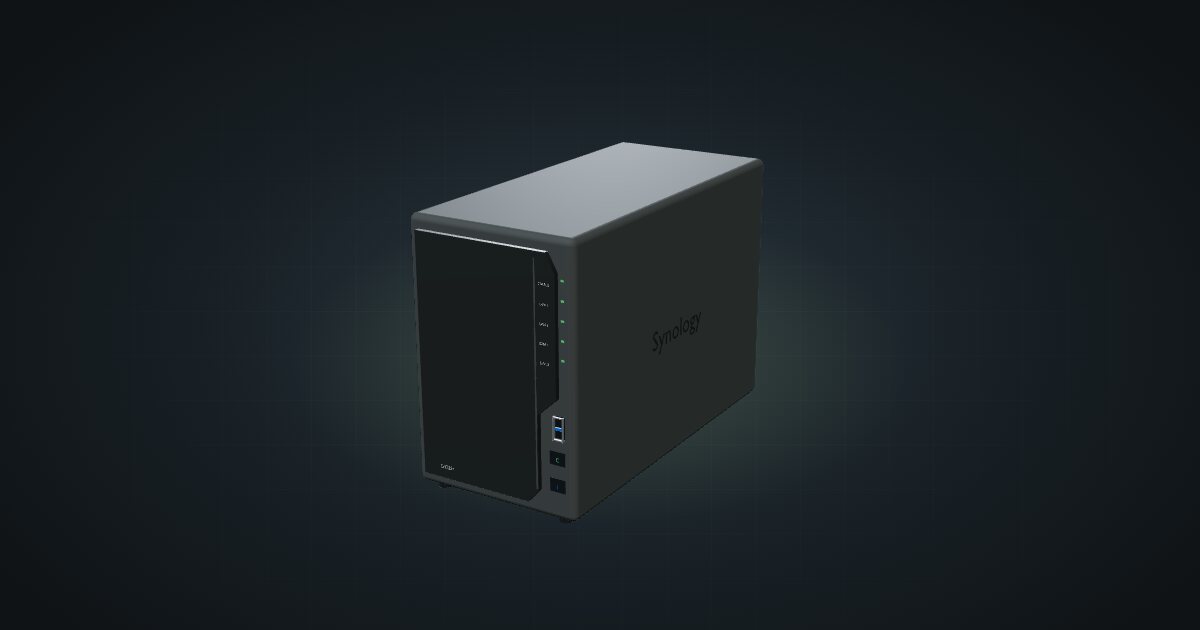
The Synology DiskStation DS225+ is a compact two-bay NAS with an Intel Celeron J4125, one Gigabit and one 2.5GbE port, and a 92 mm fan at the back. It suits a rack that needs a small, conventional file server for two drives. Like the other two-bay NAS in the catalogue, it is too deep for a shelf and stands on the rack floor instead.
At a glance
| Processor | Intel Celeron J4125, quad-core 2.0 / 2.7 GHz |
| Memory | 2 GB DDR4, expandable to 6 GB |
| Drive bays | Two, for 3.5-inch SATA HDDs or 2.5-inch SATA SSDs |
| Networking | 1 × 1 GbE + 1 × 2.5 GbE RJ45, both at the rear |
| Power | 6.08 W in HDD hibernation, 16.98 W during drive access; 60 W external adapter |
| Size | 108 × 232.2 × 165 mm (W × D × H), 1.3 kg |
Where it fits in a mini rack
Two bays make the DS225+ a natural home for shared folders, photos and backups from the other machines in the rack. Each bay takes a 3.5-inch hard drive for capacity or a 2.5-inch SSD for speed. The 2.5GbE port lets it run faster than Gigabit if your switch can, and the Gigabit port gives you a second link, for example on a separate network.
The J4125 with 2 GB of memory, expandable to 6 GB, says storage first and light extras second. Front and rear USB 3.2 Gen 1 ports cover external backup drives.
What it is not: a box for a 200 mm frame, a four-drive array, or a host for many services.
How it fits a 10-inch rack
The fit check makes the problem plain:
The placement that works is the simplest one: the DS225+ stands on its own feet on the rack floor at U1 and takes 4U of height, 232 mm deep. That fits all four 260 mm frames, the RackMate T0 Plus, T1/2 Plus, T1 Plus and T2. The 200 mm RackMate T0 and T1 are blocked because the enclosure is deeper than the frame.
Standing on the floor means the NAS always occupies the bottom of the rack, so plan the rest of the build from U5 upwards. In the four-unit T0 Plus it fills the whole frame; in the T1/2 Plus, T1 Plus and T2 it leaves room above for a switch, a router or a mini PC.
The 10i hex shelf is not an option, flat or upright: the shelf is 154 mm deep and permits 190 mm of device depth, well short of the DS225+. There is no dedicated printed mount or carrier for it in the catalogue, and none is bundled with the NAS.
Put the DS225+ at the bottom of a 260 mm frame and let its rear fan exhaust straight out of the back. Keep the space behind it clear rather than packing cables against the fan guard.
Power
Synology’s figures are 6.08 W with the drives in HDD hibernation and 16.98 W during drive access, including the manufacturer’s drive test load. Access draw is not a worst-case peak or spin-up value, and your own drives and workload will move both numbers.
The 60 W external adapter (100–240 V AC, 50/60 Hz) is a rating, not device draw. Budget the NAS from the access figure plus headroom for spin-up, and find a spot behind the frame for the adapter.
Networking and cabling
Both RJ45 jacks are on the rear: LAN 1 at 1GbE and LAN 2 at 2.5GbE. Patch each to a rear keystone and carry on from there; never loop a cable around the side of the rack to reach a front switch port. For 2.5GbE speeds the switch port on the other end has to support it too.
The two USB 3.2 Gen 1 ports sit one at the front and one at the rear.
How it differs from the DXP2800
The UGREEN DXP2800 is the other two-bay NAS in the catalogue, and it is close on paper:
- Platform: an Intel N100 with 4 cores and up to 3.4 GHz, and 8 GB DDR5 expandable to 16 GB, against the J4125 with 2 GB DDR4.
- Storage: the same two SATA bays, plus two NVMe SSD slots that the DS225+ spec sheet does not list.
- Network: a single 2.5 GbE port, against the DS225+'s 1 GbE plus 2.5 GbE pair.
- Power: 5.24 W in drive hibernation and 16.38 W during drive access, close to the DS225+ figures, each including its maker’s own drive test load.
- Placement: the same. The DXP2800 is planned at 231 mm deep, practically the same as the DS225+, and both stand on the rack floor at U1 in 4U in the 260 mm frames.
The four-bay DXP4800 goes further, with a printed 5U carrier on top of the floor option, but needs 257.5 mm of depth to do it.
Full specifications
Plan it
Open the Synology DS225+ in the catalogue and add it to a rack plan: the configurator stands it on the rack floor at U1 in any of the 260 mm frames. There are no community builds with it yet.
Comparing two-bay boxes? Read the UGREEN DXP2800 guide; for four bays, the UGREEN DXP4800 guide.
Sources
Related guides
UGREEN NASync DXP2800 in a 10-inch rack
The two-bay UGREEN DXP2800 in a 10-inch rack: 4U on the rack floor of a 260 mm frame, one rear 2.5GbE port, two NVMe slots and an N100.
UGREEN NASync DXP4800 in a 10-inch rack
The four-bay UGREEN DXP4800 in a 10-inch rack: 4U on the floor or a 5U printed carrier, 260 mm frames only, two rear 2.5GbE ports.
MikroTik RB5009UG+S+IN in a 10-inch rack
MikroTik RB5009UG+S+IN in a 10-inch rack: 2.5 GbE, seven Gigabit ports and 10G SFP+ in a fanless case that stands upright in 6U.